We built an iMessage extension based messaging assistant
The goal of the hackathon was to build something exciting on top of the platform that Series11Series is an AI social network company based in NY (learn more here) provided. My team built an AI-powered messaging assistant that help make conversations between users and provides intelligent reply suggestions. You can see the demo below.
How does it work?
The basic way mercury works is that when a user messages a Series number, the iMessage API publishes an event to a Kafka topic. A worker consumes it, updates the database, and can send replies back through the API. Separately, a FastAPI service reads conversation history from the database, calls Google Gemini to generate reply suggestions based on user profiling, and returns them to the iMessage extension on the frontend.
My teammate built the Swift iMessage extension and wired it to the backend. Neither of us had written Swift before, so getting that working in 24 hours was its own challenge.
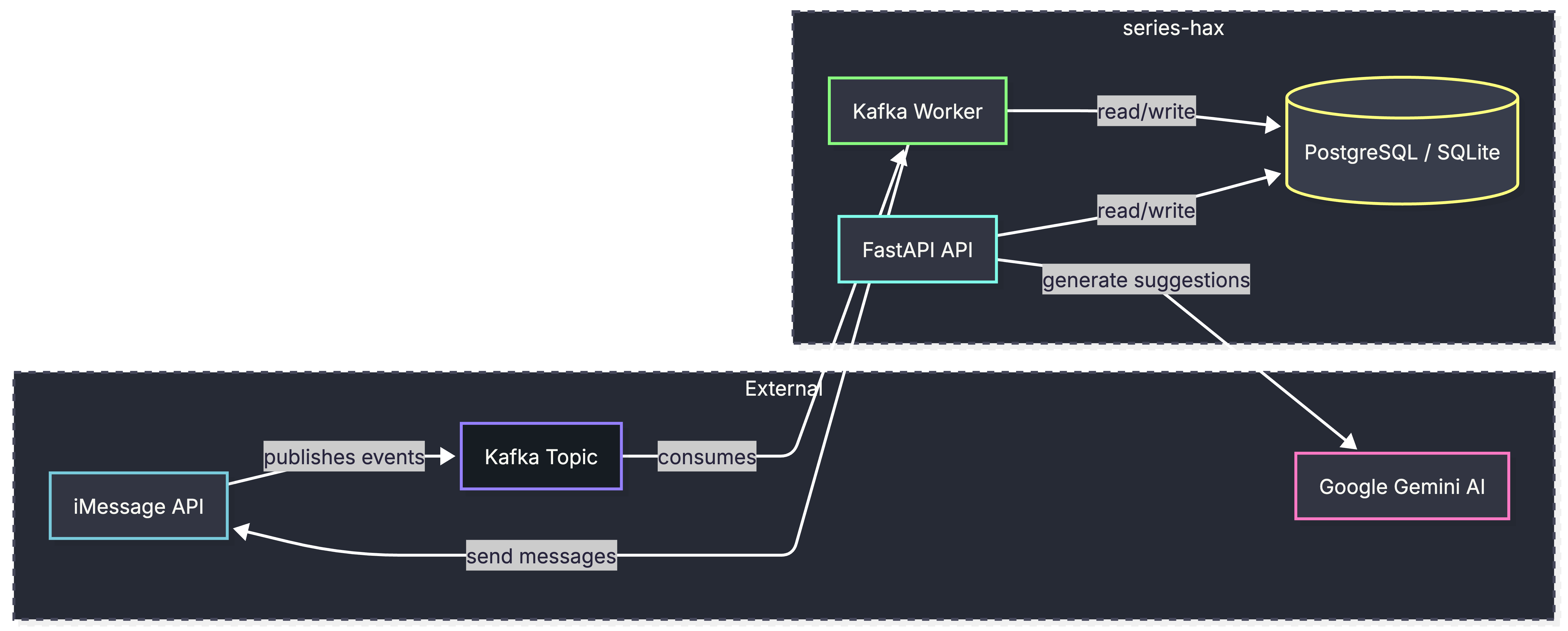
Series gave us two main building blocks: an iMessage API for sending and receiving messages, and a Kafka cluster for event streaming. I had never used Kafka (or any distributed event platform for that matter) before, so much of the hackathon was spent learning the stack on the fly.
Learning and Using Kafka
Apache Kafka is a platform for managing data flow in high-throughput, distributed systems. To better understand it, we can first imagine a simple producer-consumer setup22Producer-consumer patterns are common: one process produces information and another consumes it. Typically, the data sits in a queue or similar structure until it is processed. A simple example is a web server, where the client sends a request, the server consumes it, processes it, and returns a response. with a simple queue in the middle. As throughput grows, you need to distribute compute across machines. Kafka provides the tools and abstractions to scale that pattern and coordinate those distributed processes.
How does it work?
Kafka solves this problem with a publish-subscribe (pub-sub) model33In a publish-subscribe model, producers publish data to named channels rather than sending it directly to consumers, and consumers subscribe to the channels they care about. This decouples the two sides: neither needs to know about the other. that distributes data across machines without conflicts or data loss. Consider a system with many producers emitting data that many different consumers need to read. Spreading that data across servers while preserving its integrity is hard, especially when order and timing matter, as they do for things like logs for example. This is the kind of problem where Kafka is most useful.
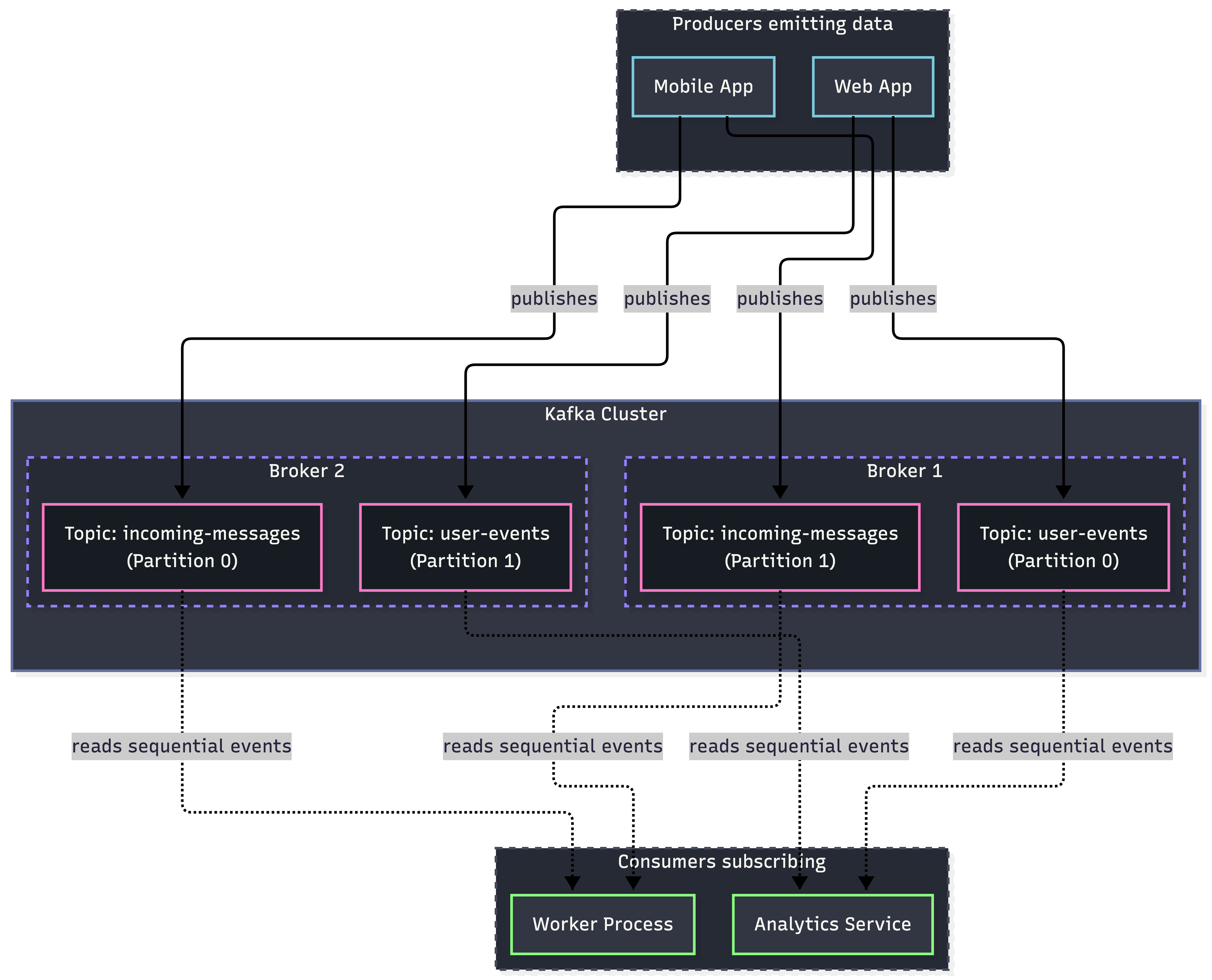
To mitigate this, Kafka organizes messages into these things called topics. A topic is just basically a named stream of events, which you can think of as a high-level category you append messages to, like incoming-messages or user-events. Topics are append-only and sequential44Append-only storage is one reason Kafka handles high throughput. Random reads from disk are expensive, but sequential writes and reads let consumers jump to a fixed offset and process data in order without scanning the whole stream., so new events are always added to the end and consumers read forward from where they left off.
Those topics live inside a Kafka cluster, which is just a group of servers, each called a broker, that handles reads and writes for the topics it hosts. To scale further, Kafka splits a topic into partitions, which are smaller ordered sub-streams that can live on different brokers. When a producer sends a message, Kafka routes it to the right broker and partition based on a partitioning policy, so work can be spread across the cluster and processed in parallel.
On the read side, Kafka can groups consumers into consumer groups. A consumer group is a set of consumers that cooperate to read from the same topic: Kafka assigns each partition to at most one member of the group, so the group can process a topic in parallel without two consumers reading the same message. If a topic has four partitions and your group has four workers, each worker gets one partition. Add a fifth worker and it sits idle until a partition is reassigned, usually because another consumer failed or left the group. Different consumer groups are independent: if both a worker and an analytics pipeline subscribe to user-events, each group receives every message, but within each group the work is split across members.
The full flow that is a bit simple looks like this where producers send events to the cluster; Kafka writes each event to the correct partition of the right topic; consumers (or consumer groups) subscribe to the topics they care about and read events as they arrive, even when those topics are spread across multiple brokers.
Writing a Consumer Process
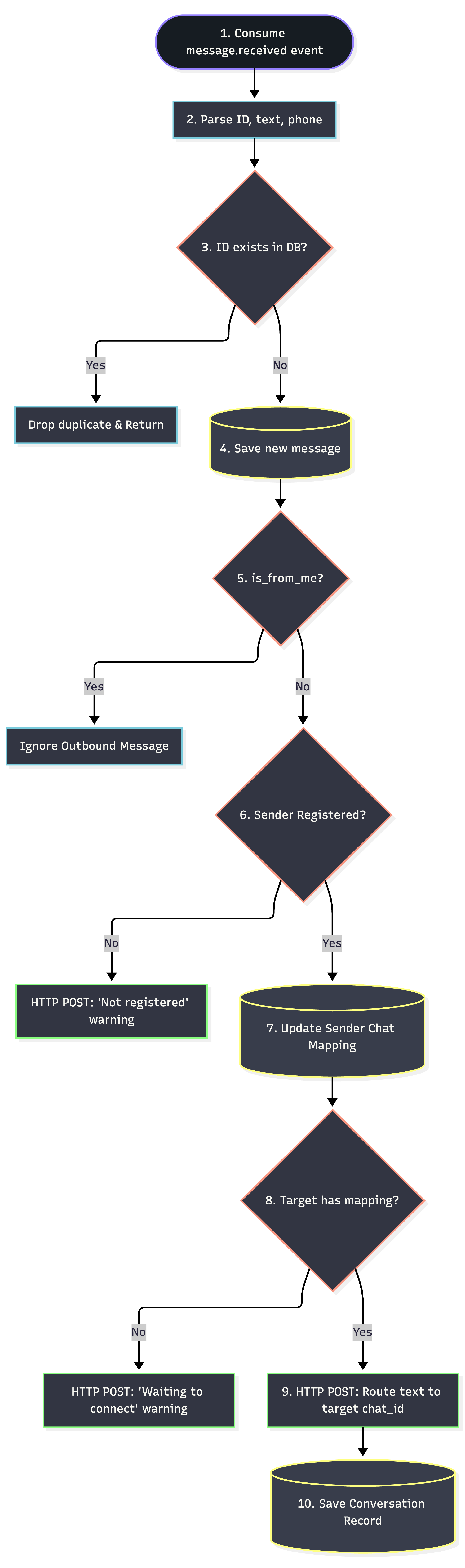
For the hackathon, we didn’t have to deal with the entire complexity of setting these things up from scratch. We were provided a Topic and the auth credentials for it. For our project, the producer was the iMessage API, which would emit the messages as they are coming. It would get appended to our topic, and we had to write a consumer process, which will do the thing that we need, which is save few important information in the database in proper format, and pass information to the FastAPI API for downstream processing of the conversation.
We wrote a consumer worker, using the KafkaConsumer class from kafka-python55Docs: (here) library. The main polling loop that the worker was doing was pretty simple:
try:
    for message in consumer:
        print(f"\n{'='*60}")
        print(f"NEW MESSAGE RECEIVED!")
        print(f"Topic: {message.topic}")
        print(f"Partition: {message.partition}")
        print(f"Offset: {message.offset}")
        print(f"Timestamp: {datetime.fromtimestamp(message.timestamp/1000)}")
        print(f"Value: {message.value}")
        print(f"{'='*60}")

        # Process the event
        event = message.value
        db = SessionLocal()
        try:
            asyncio.run(process_message_event(client, db, event))
        except Exception as e:
            print(f"Error processing message: {e}")
            import traceback
            traceback.print_exc()
            db.rollback()
        finally:
            db.close()
The processing step is explained here:
Designing the API and the Database
The API and database were the most straightforward part of the build. The FastAPI service had a one simple job: read conversation history from the database and return reply suggestions. We did not have real user profiles to work with, so we mocked two users with hard-coded bios and interests. In production, that slot would be filled by whatever the system already knows about each person. With that context in hand, we passed the conversation and profile to Gemini and asked it to generate a few candidate replies.
It is hard to build something like this IRL in production.
Building this made it clear how hard the problem would be in production. One thing is that reading user messages raises real privacy questions, and most people would not be comfortable with an AI sitting in on their conversations. A feature like this, therefore, is not easy to roll out too. On-device models would help: if inference ran locally, nothing would need to leave the phone. We did not spend much time on encryption or other safeguards either, and even when the pipeline works, the suggestions often sound off. Mercury is probably not something I would ship as-is, but it was a genuinely useful way to learn Kafka, event-driven backends, and what it takes to wire an AI feature into a messaging flow.